
Last updated on
Oct 23, 2026

TX Comptroller 74-194 2003 free printable template
pdfFiller is not affiliated with any government organization

Fill out
Complete the form online in a simple drag-and-drop editor.

eSign
Add your legally binding signature or send the form for signing.

Share
Share the form via a link, letting anyone fill it out from any device.

Export
Download, print, email, or move the form to your cloud storage.
Why pdfFiller is the best tool for your documents and forms


End-to-end document management
From editing and signing to collaboration and tracking, pdfFiller has everything you need to get your documents done quickly and efficiently.
Accessible from anywhere
pdfFiller is fully cloud-based. This means you can edit, sign, and share documents from anywhere using your computer, smartphone, or tablet.
Secure and compliant
pdfFiller lets you securely manage documents following global laws like ESIGN, CCPA, and GDPR. It's also HIPAA and SOC 2 compliant.
What is TX Comptroller 74-194
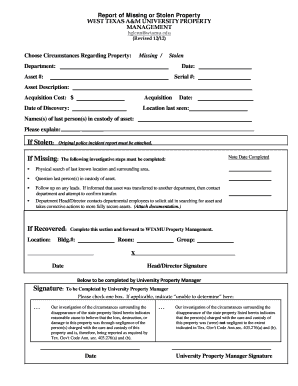
The Missing Damaged or Stolen Property Report is a government form used by Texas agencies to report missing, damaged, or stolen state property.
pdfFiller scores top ratings on review platforms




Who needs TX Comptroller 74-194?
Explore how professionals across industries use pdfFiller.

TX Comptroller 74-194 is needed by:
-
Agency heads responsible for state property management
-
Designated representatives tasked with property reporting
-
Legal and compliance personnel in government institutions
-
State employees overseeing property loss documentation
-
Auditors requiring verification of property status
-
Public officials managing asset accountability
Comprehensive Guide to TX Comptroller 74-194
What is the Missing Damaged or Stolen Property Report?
The Missing Damaged or Stolen Property Report is a crucial document in Texas used to report instances of missing, damaged, or stolen state property. This form holds significance for government agencies and institutions as it ensures accountability and compliance with regulations concerning state assets. Various incidents trigger the need for this report, including theft, accidental damage, or misplacement of property.
Submitting a missing property report helps maintain a record for both law enforcement and institutional oversight, promoting transparency in handling state assets.
Purpose and Benefits of the Missing Damaged or Stolen Property Report
Prompt issuance of the Missing Damaged or Stolen Property Report is vital for effective asset tracking. By documenting incidents quickly, agencies can enhance their recovery efforts and minimize financial losses associated with lost property. This report also fulfills legal obligations under Texas law, ensuring proper procedures are followed when state property is compromised.
-
It acts as an official record for investigations.
-
Supports tracking efforts for missing or stolen items.
-
Helps fulfill compliance requirements for state agencies.
Who Needs the Missing Damaged or Stolen Property Report?
The responsibility for completing the Missing Damaged or Stolen Property Report typically falls on the Agency or Institution Head and a designated representative. These individuals are critical in submitting accurate reports when incidents occur. Depending on the situation, different roles may be obligated to ensure the report is submitted in a timely manner.
Involving the appropriate parties in the reporting process is essential to maintain integrity and compliance with state regulations, thereby upholding the institution's accountability.
How to Fill Out the Missing Damaged or Stolen Property Report Online (Step-by-Step)
Filling out the Missing Damaged or Stolen Property Report online requires careful attention to detail. Here’s a step-by-step guide for accurate completion:
-
Access the Texas government property form through a secure online platform.
-
Enter the name of the agency in the designated field.
-
Provide the place of occurrence of the incident.
-
Detail the property involved, including descriptions and values.
-
Complete all required fields to ensure valid submission.
Make sure to review all information for accuracy before submitting the form to avoid delays.
Review and Validation Checklist for the Missing Damaged or Stolen Property Report
When submitting the Missing Damaged or Stolen Property Report, common errors can hinder processing. Utilize the following checklist to validate your submission:
-
Ensure all required fields are filled accurately.
-
Double-check signatures for authenticity.
-
Verify that documentation supports all claims made in the report.
-
Confirm the report is dated correctly.
Having proper signatures is crucial as it signifies the approval and acknowledgment of the reported information.
Submission Methods and Delivery of the Missing Damaged or Stolen Property Report
Agency personnel have multiple options for submitting the completed Missing Damaged or Stolen Property Report. Accepted methods include:
-
Electronic submission via designated government portals.
-
Hard copy delivery through mail or in-person submission.
It's necessary to follow the prescribed delivery formats, and you can expect processing times to vary based on the method of submission chosen.
What Happens After You Submit the Missing Damaged or Stolen Property Report?
After submitting the Missing Damaged or Stolen Property Report, agencies will receive a confirmation of receipt. Tracking of the submission status is available online, which allows users to monitor progress.
If any issues arise from the submission, agencies will be informed of the necessary next steps, ensuring transparency in the reporting process.
Security and Compliance for the Missing Damaged or Stolen Property Report
pdfFiller prioritizes document security, ensuring that the Missing Damaged or Stolen Property Report complies with relevant regulations. The platform features strong security measures, such as 256-bit encryption and adherence to SOC 2 Type II, HIPAA, and GDPR standards.
Data privacy is paramount when handling sensitive reports, allowing users to comfortably complete their submissions knowing that their information is protected.
How pdfFiller Can Help with Completing the Missing Damaged or Stolen Property Report
Utilizing pdfFiller streamlines the process of completing the Missing Damaged or Stolen Property Report, offering tools for editing and filling out forms efficiently. The convenience of eSigning enables users to obtain necessary signatures without complications.
With its user-friendly interface and robust customer support options, pdfFiller simplifies managing any form requirements related to this report.
Sample or Example of a Completed Missing Damaged or Stolen Property Report
Viewing a sample or example of a completed Missing Damaged or Stolen Property Report can greatly aid in understanding the required format and necessary information. Common entries provide context and clarity for which details are expected.
Users benefit from examining multiple entries to ensure they align their submissions with institutional guidelines and maintain compliance.
How to fill out the TX Comptroller 74-194
-
1.Access pdfFiller and search for the 'Missing Damaged or Stolen Property Report' in the document library.
-
2.Click on the form to open it in the pdfFiller interface, enabling you to start editing easily.
-
3.Gather necessary details such as the name of the agency, the place of occurrence, and the responsible individuals before filling out the form.
-
4.Begin by entering the required information into the blank fields, carefully following the prompts on the form.
-
5.Utilize the checkboxes where applicable to indicate specific circumstances regarding the property.
-
6.Review the information entered for accuracy, ensuring no elements are missed, particularly in the evidence sections.
-
7.Ensure the form is signed by either the agency/institution head or a designated representative.
-
8.Once completed, save your progress and download a copy of the form if needed.
-
9.Submit the form through pdfFiller by following the submission instructions or links provided within the platform.

Who is eligible to submit the Missing Damaged or Stolen Property Report?
Only authorized personnel, such as agency heads or designated representatives with higher ranks than the property manager, can submit this form.
What is the deadline for submitting this report?
The report must be submitted to the Office of the Attorney General within 72 hours of discovering the property's condition.
How do I submit the Missing Damaged or Stolen Property Report?
You can submit the report through pdfFiller by downloading the completed form or utilizing any submission options available on the platform.
What information do I need to provide with the form?
Essential information includes details about the property, circumstances of the loss, and individuals responsible for the assets.
What are common mistakes to avoid when completing this report?
Common mistakes include failing to gather all required details before filling out the form and not obtaining the necessary signatures from authorized personnel.
How long does it take to process the Missing Damaged or Stolen Property Report?
Processing times can vary based on the volume of submissions, but it is recommended to follow up within a few days after submission for status updates.
Are there fees associated with submitting the report?
Generally, there are no fees for submitting the Missing Damaged or Stolen Property Report, but it's advisable to check with the Office of the Attorney General for any specifics.
TX Comptroller 74-194 Form Versions
Related Forms





Related Catalogs
Get the latest insights from our blog


If you believe that this page should be taken down, please follow our DMCA take down process
here
.
This form may include fields for payment information. Data entered in these fields is not covered by PCI DSS compliance.